


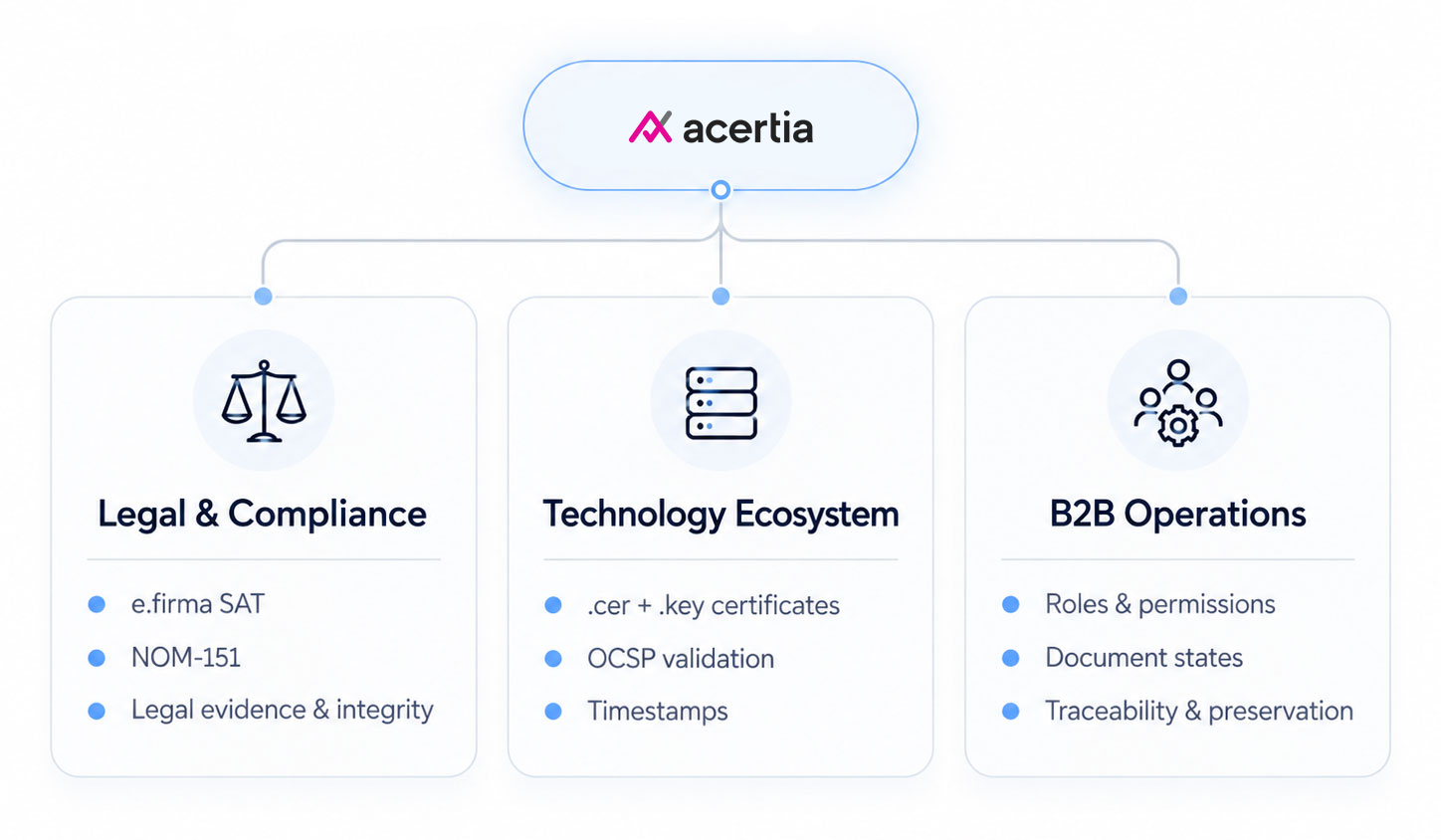
Acertia is a B2B digital signing platform that enables organizations to manage document workflows using Mexico’s SAT e.firma, while providing traceability, legal evidence and NOM-151 document preservation.
Overview
As Product Designer, I translated business and regulatory requirements into user roles, product flows, user stories, wireframes and final interfaces, designing the end-to-end experience from document creation to signing, tracking and legal validation.
Software to use:



Role
- Product designer
- UX/UI Designer
- UX Researcher
Company
- Diverza
Product
- B2B
- Legal tech
- Compliance
Platform
Web App
Year
2026
Context
Acertia operates in a regulated environment where digital signing requires legal validity, identity verification, document integrity and traceability.
Problem
Trust & legal certainty
Users need confidence that their identity credentials are protected and that the resulting document has legal validity.
Technical friction
Managing .cer, .key, passwords and certificate validity adds complexity to an action users expect to be simple.
Fragmented workflows
Email, external applications and manual follow-ups make it difficult to track participants and document status.
Primary interaction
File upload
File publication
Digital signature
Research & Discovery
01 — Signing needs to be simple, even when the process behind it is complex
Teams managing contracts, agreements and administrative documents need a signing process that is fast, reliable and easy for every participant involved. Users expect to avoid printing, scanning and exchanging files manually, while still knowing who has signed, what is pending and where the final document is stored.

02 — NOM-151 extends the experience beyond the signature
NOM-151 introduces requirements related to the preservation and integrity of electronic documents, including evidence that helps demonstrate that a document has not been altered after the process. Within Acertia, document conservation therefore became part of the lifecycle rather than an isolated backend task.
03 — e.firma gives the signature legal significance
The product was designed around the e.firma del SAT (formerly FIEL) as the advanced electronic signature mechanism for the MVP. Because the process involves identity credentials and legally relevant evidence, signing could not be treated as a simple visual confirmation; the system had to consider authentication, certificate validity, integrity and traceability throughout the flow.
Findings
The discovery process helped identify the main friction points and translate them into concrete product decisions.
| Finding | What we learned | Design implication |
|---|---|---|
| 01 e.firma creates technical friction | Users must manage .cer, .key, passwords and certificate validity. | The signing flow needed to be guided, explicit and easy to recover from. |
| 02 Trust is critical | Users need confidence that credentials, identity and legal evidence are protected. | Security and legal status had to be visible throughout the experience. |
| 03 Tracking is essential | Users need to know what is pending, who has signed and the current document status. | The product needed centralized statuses, roles and document history. |
| 04 Roles require different experiences | Solicitants, signers and observers do not need the same permissions or level of access. | Access and actions had to adapt by role, including guest participation. |
Architecture and flows
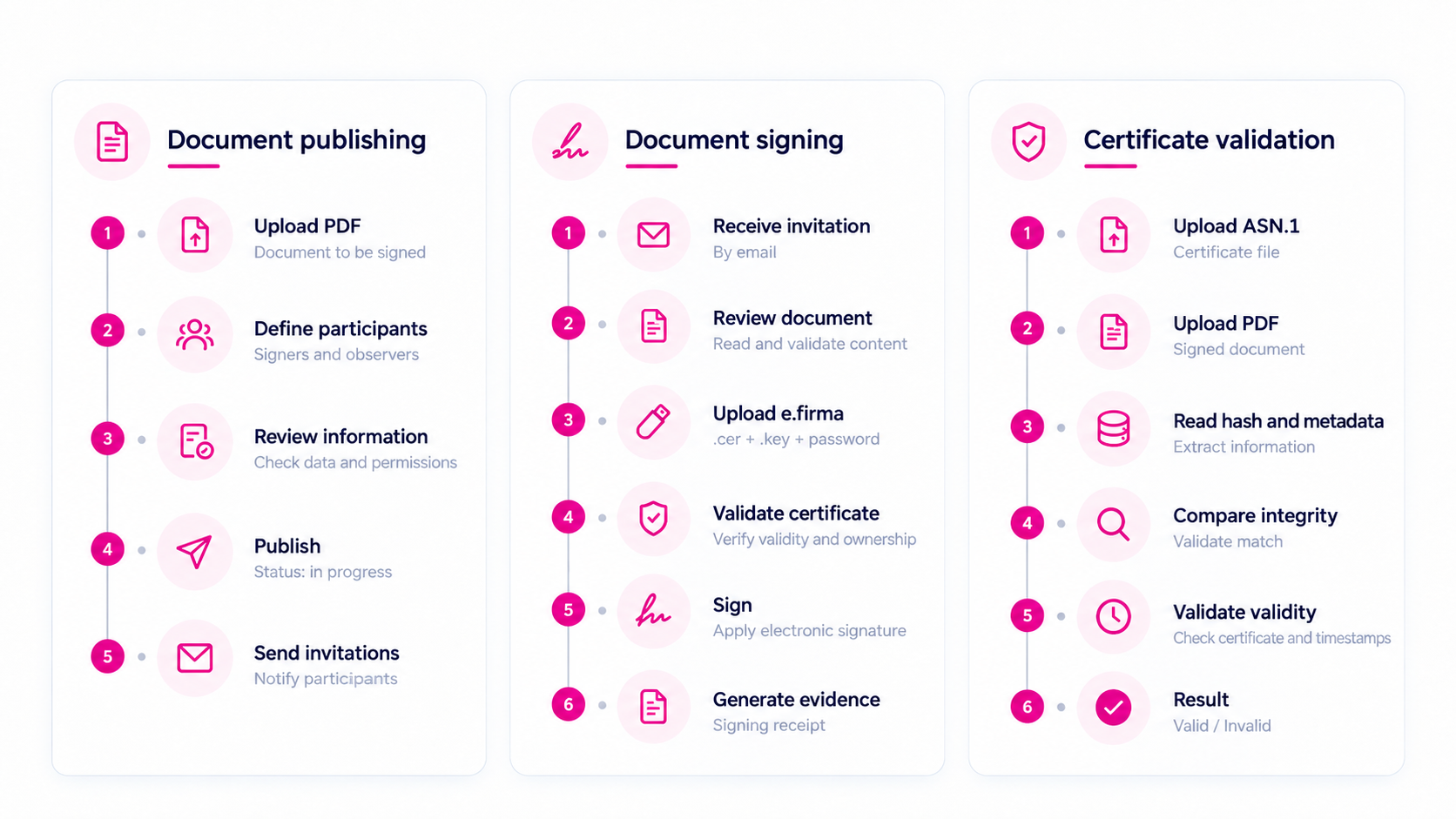
Full flows only on interview
Product decisions
Guest access instead of mandatory registration
External signers and observers can access a specific document through a secure invitation without creating an account first. Registration remains optional, reducing friction while preserving traceability and access control.
Role-based experiences
The product separates the experience of registered users, invited signers and observers, adapting permissions and actions according to each participant’s role in the document.
Strong authentication for registered users
Because the platform manages e.firma-based signatures, legal evidence and NOM-151 preservation, account access was designed with mandatory two-factor authentication.
Treat signing as a document lifecycle, not a single action
The experience connects document creation, participant management, signing, status tracking and evidence generation instead of treating the signature as an isolated step. NOM-151 conservation is triggered only after all assigned signers complete the process.
Make validation understandable to the user
For NOM-151 validation, the system compares the uploaded document against the conservation evidence and returns a clear valid/invalid result while keeping an auditable record of the process.

Design
Primary colors
#E50695
#485E92
Action colors
#485E92
#8C1D18
#066636
#D38F2F
Font colors
#000000
#AAAAAA
#FFFFFF
Grey colors
#555555
#717171
#8E8E8E
#AAAAAA
#AAAAAA
#E3E3E3
Typography
Futura Bold
Aa
A B C D E F G H I J K L M N O P Q R S T U V W X Y Z
a b c d e f g h i j k l m n o p q r s t u v w x y z
Futura
Aa
A B C D E F G H I J K L M N O P Q R S T U V W X Y Z
a b c d e f g h i j k l m n o p q r s t u v w x y z
Wireframe & Mockup
Prototype only on interview
Solution
A unified digital signing experience that connects document publishing, multiple signers, process tracking, and signature evidence validation in a single flow.
My documents
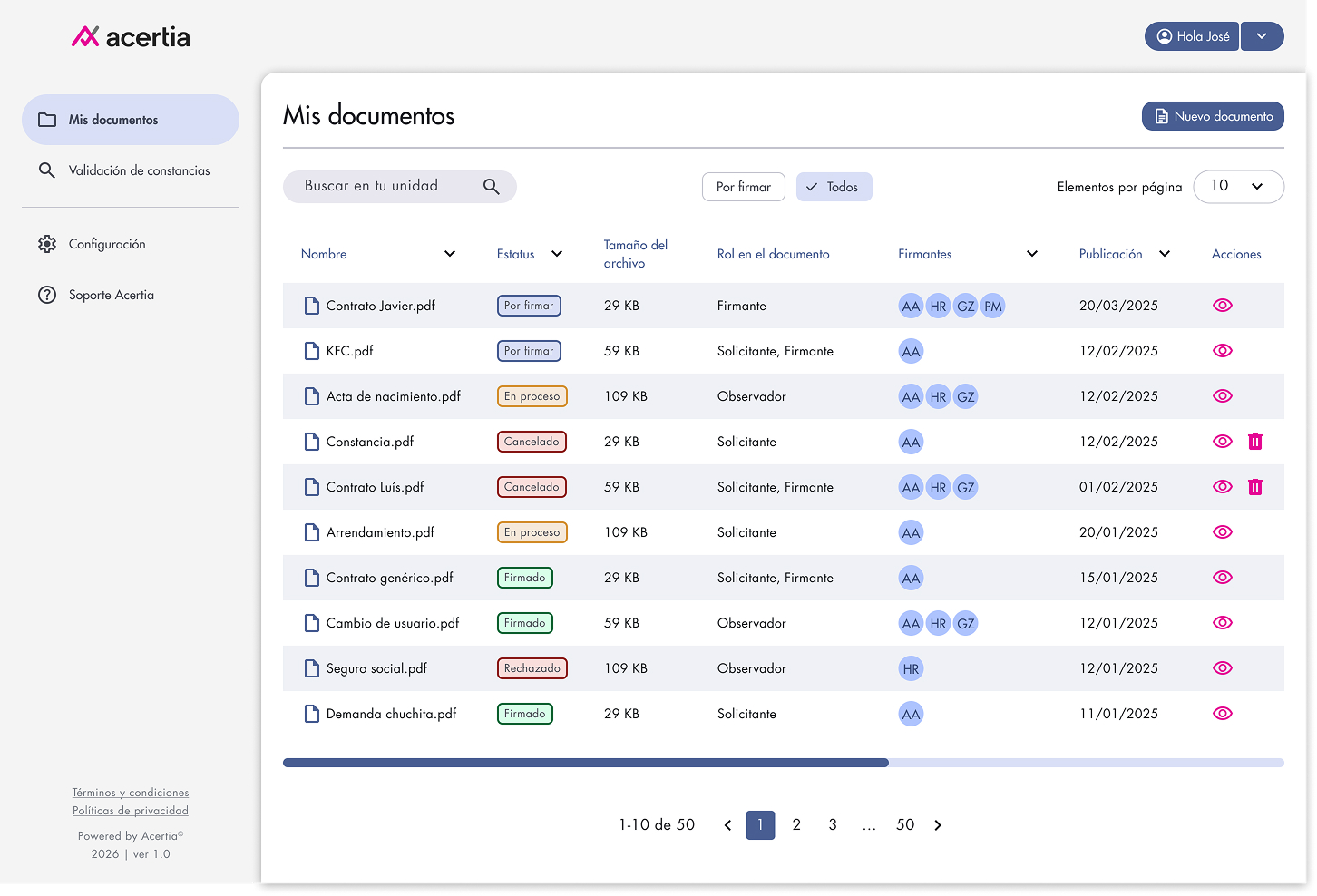
Quick filters help users focus on documents that require action, such as pending signatures, without scanning the entire list.
Participant initials provide an immediate overview of who is involved in each document and make multi-signer workflows easier to understand.
A clear primary action lets users start a new signing process by uploading a document and defining its participants.
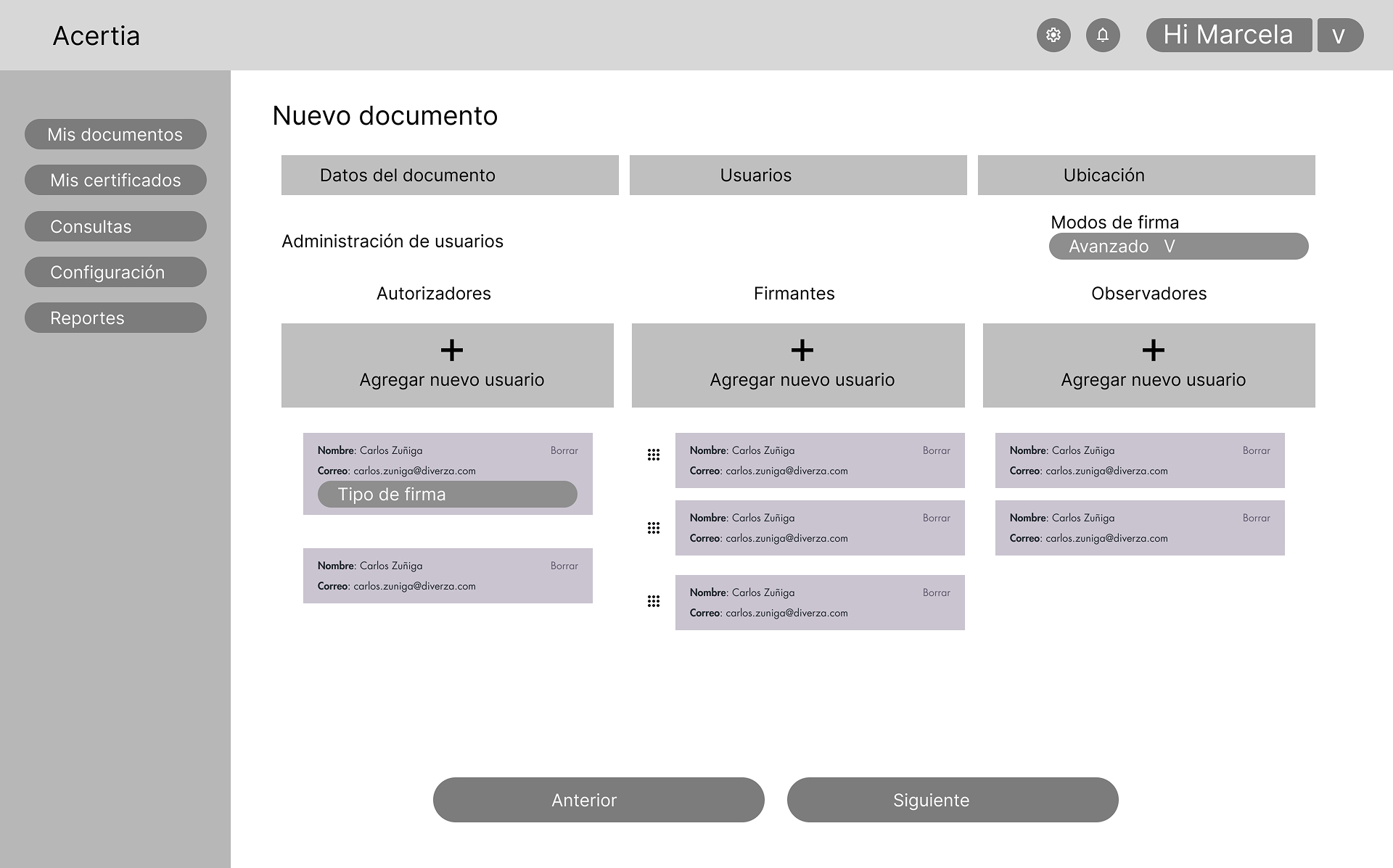
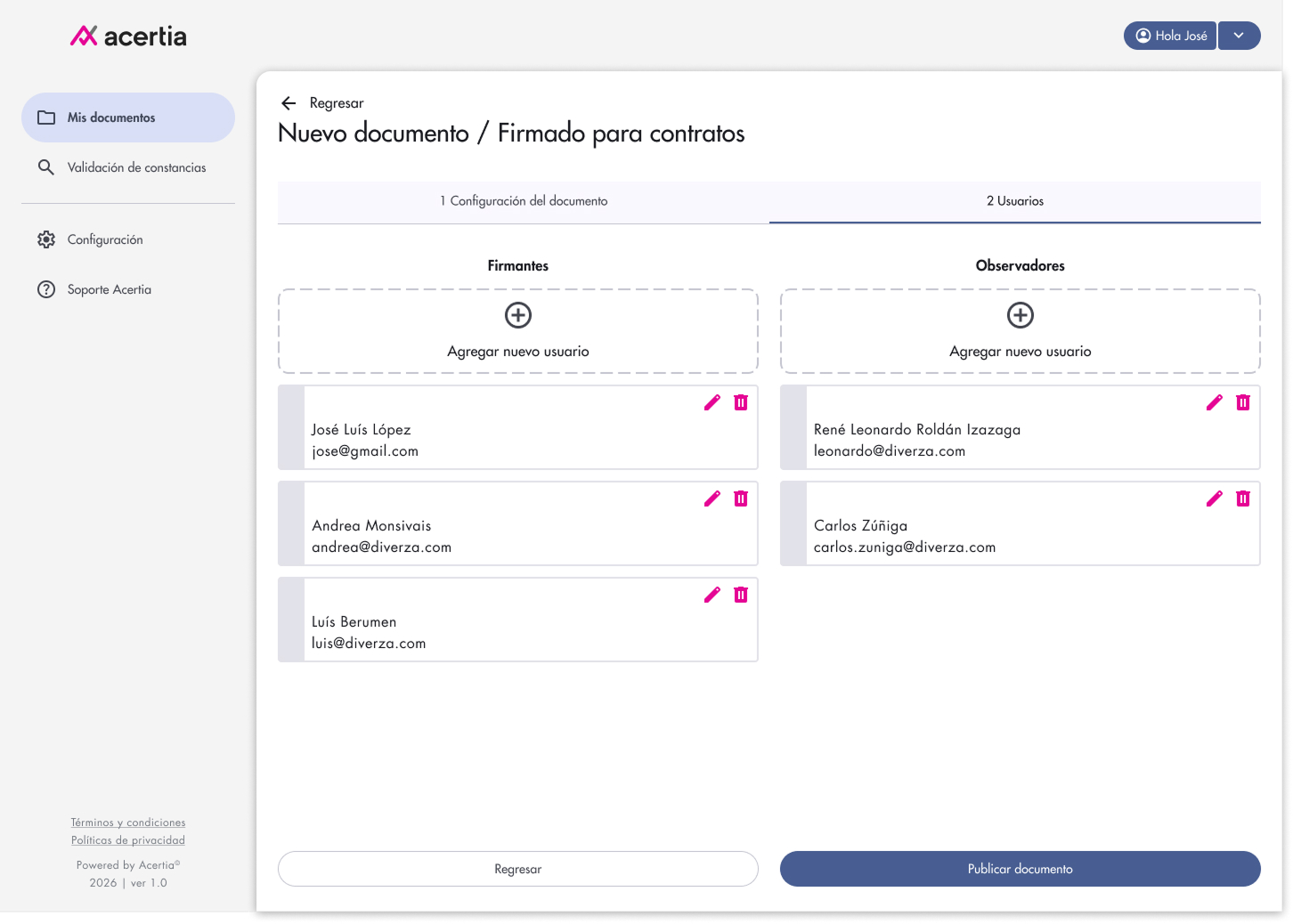
Add signatories
Signers and observers are separated to clearly define each participant’s responsibility in the document workflow.
Participant details can be edited or removed before the signing process starts, helping prevent invitation and access errors.
File ready for signing
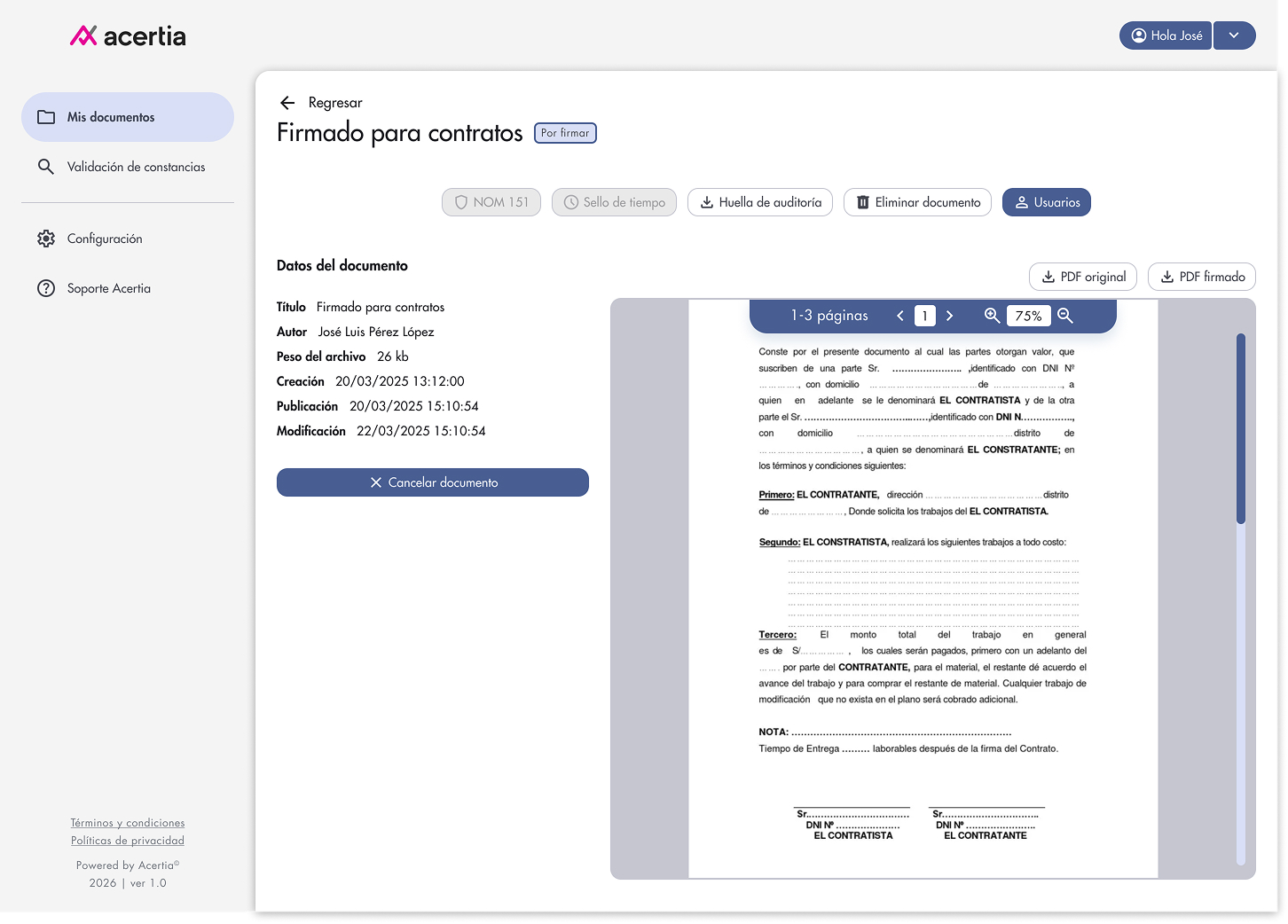
The document status clearly indicates when the file is ready and waiting for signatures.
NOM-151, timestamp and audit trail actions keep legal evidence connected to the document lifecycle.
Key information such as author, creation date, publication date and file size remains visible before signing.
Users can review the full document directly in the platform before continuing with the signing process.
File to sign with FIEL (Acertia)
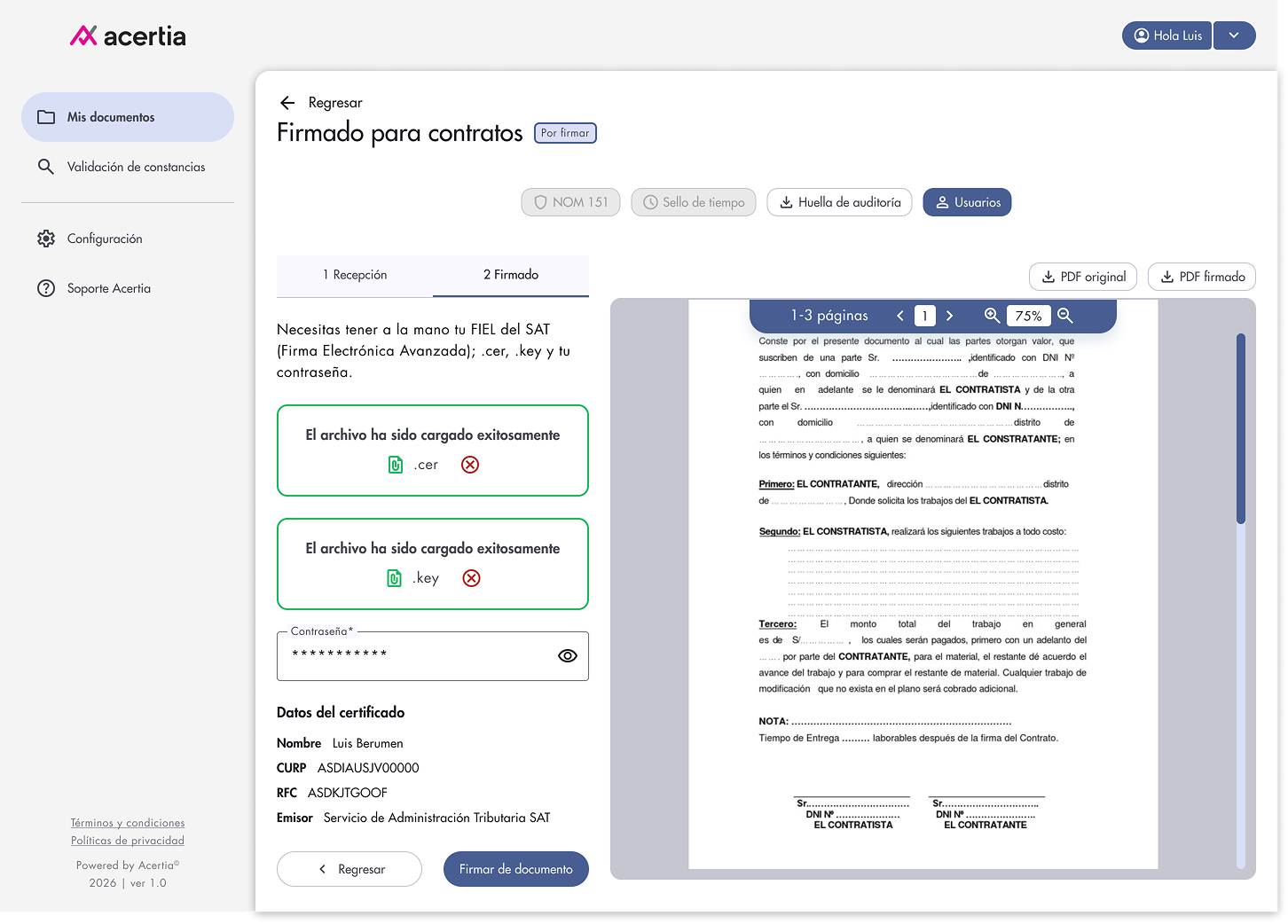
The signer uploads the .cer and .key files required to authenticate the signature with SAT e.firma.
Immediate visual feedback confirms that each credential file was uploaded successfully before the user continues.
Personalization portal client
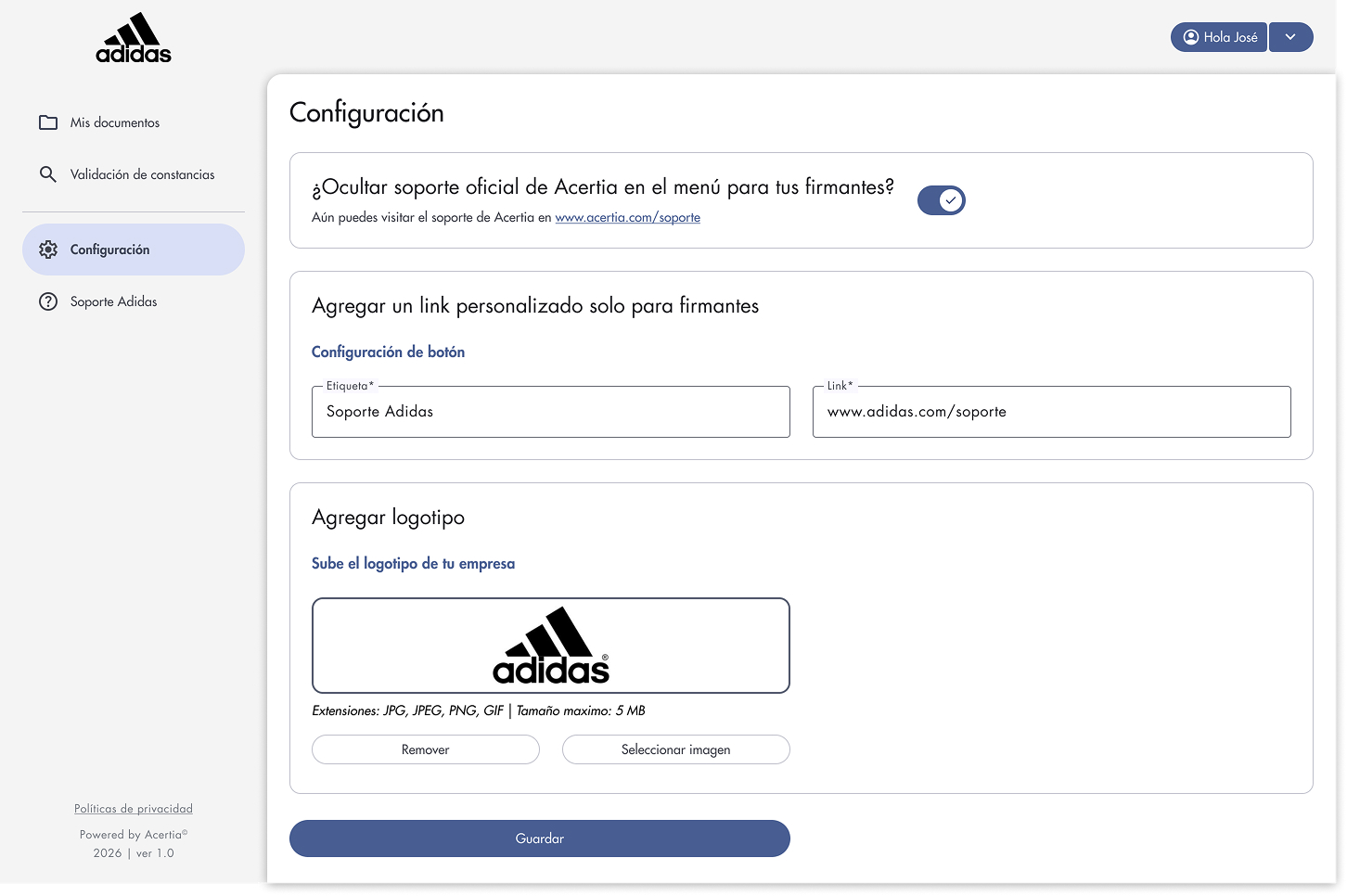
Administrators can hide Acertia’s default support option to keep the signer experience aligned with the client’s own service model.
A personalized support label and URL can be configured specifically for signers, redirecting them to the client’s own assistance channel.
Clients can upload their own logo so the portal reflects their brand throughout the signing experience.
Prototype only on interview
Validation
Document Upload · PDF Upload · Document Creation · Participant Assignment · Signers & Observers · Document Publishing · Document Status · Document Tracking
The MVP was validated against functional, security and business-rule scenarios defined during product design. Each critical flow included acceptance criteria and QA coverage to verify that permissions, document states, authentication and legal-validation behaviors worked as expected.
01 — Access & security
Login, 2FA, incorrect or expired OTPs, resend behavior and temporary lockouts were covered as part of QA validation.
02 — Roles & document permissions
The experience was checked to ensure that signers, observers and requesters only saw the actions available to their role, including restrictions around deleting or cancelling documents.
03 — Critical document scenarios
The product covered alternative states such as rejection, blocking subsequent signatures, status updates and notification behavior, rather than validating only the happy path.
04 — NOM-151 validation
The constancy-validation flow was tested against valid, invalid, expired and corrupted-file scenarios, including clear result feedback and audit logging.
Impact
Reduced friction for external signers
Guest access allows invited participants to review and sign a specific document without being forced to create an account first, supporting faster adoption while maintaining traceability.
Greater security and legal traceability
2FA, role-based permissions and auditable actions strengthen access control around documents, signatures and legal evidence.
More transparent document workflows
Centralized document states, participant roles and signing progress make it easier to understand what has been completed, rejected or is still pending.
Legal evidence integrated into the workflow
NOM-151 preservation and validation become part of the document lifecycle, allowing users to verify conservation evidence and receive a clear validation result.
Better fit for enterprise adoption
Brand configuration and customized support options allow the experience to adapt to each organization instead of behaving as a generic signing portal.
Project learning
Compliance must be translated into understandable experiences
Designing for e.firma and NOM-151 showed me that regulatory requirements should not simply live in backend processes. Users need clear states, evidence and feedback to understand what is happening and why it matters.
Reducing friction does not mean reducing security
Guest access, role-based permissions and 2FA demonstrated that a secure product can still remove unnecessary barriers, especially for external signers who only need to complete a specific task.
Roles define the experience before screens do
Understanding the differences between requesters, signers and observers became essential for defining permissions, navigation and available actions throughout the document lifecycle.
Critical workflows need more than a happy path
Signing products must account for rejection, expired credentials, invalid files, incomplete signatures and validation failures. Designing these states early helped create a more predictable and resilient experience.