


Cancelación Fiscal is a B2B solution designed to manage and automate CFDI cancellation processes. It enables companies to check invoice status, submit cancellation requests, manage SAT cancellation reasons and maintain documentary traceability throughout the process.
Overview
The solution was conceived to operate through both a web experience and system-to-system integrations, helping accounting teams manage cancellation processes with greater control and visibility.
Software to use:




Role
- Product designer
- UX/UI Designer
- UX Researcher
Company
- Diverza
Product
- B2B
- Fintech
- Fiscal technology
Platform
Web App
Year
2026
Problem
High-volume corrections can become costly and error-prone
Payroll runs, invoice batches or operational errors may require many CFDIs to be reviewed and cancelled, increasing manual effort and the risk of leaving incorrect documents active.
Cancellation requires understanding fiscal dependencies
Users need to know whether a CFDI is cancelable, whether related invoices must be resolved first, which SAT reason applies and whether receiver acceptance is required.
Limited traceability can enable misuse and financial leakage
Without clear permissions and an audit trail, unauthorized or inappropriate cancellations can be difficult to detect, creating opportunities for internal misuse, reconciliation issues and small recurring financial losses.
Primary interaction
Invoice
Request
Cancellation
Context
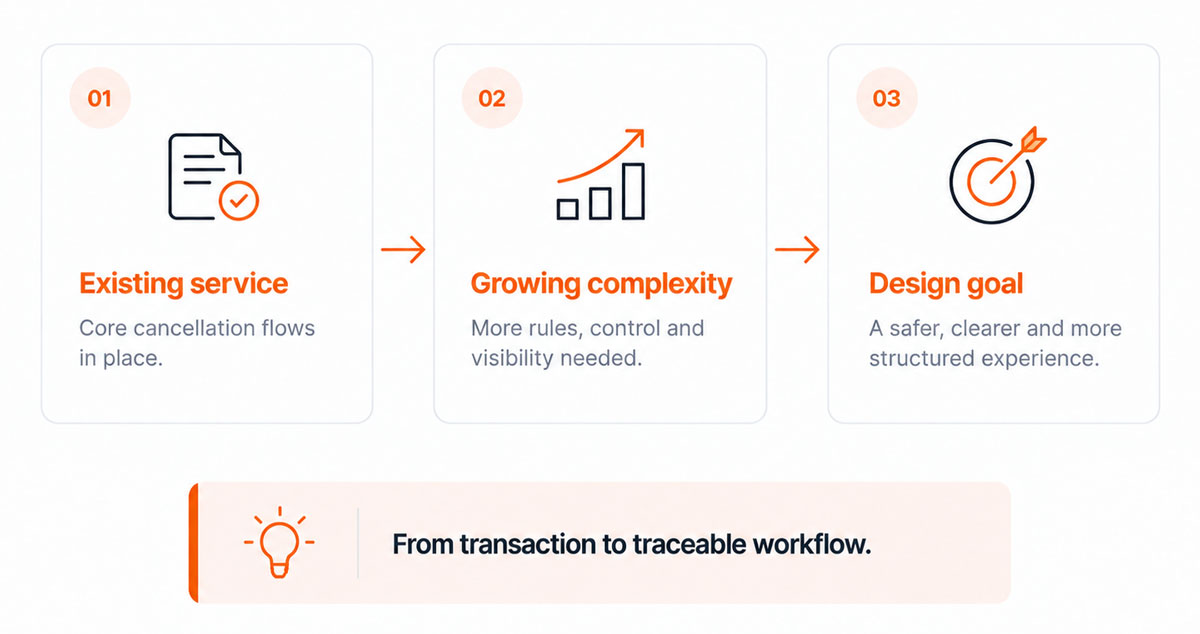
Cancelación Fiscal was an existing CFDI cancellation service that needed to evolve beyond a basic transactional flow. The product already supported cancellation requests, status checks, related CFDI validation and SAT response handling, but new fiscal requirements and operational needs increased the importance of prevention, documentary evidence and traceability.
The redesign effort focused on adapting the experience to more complex scenarios, including cancellation deadlines, related invoices, evidence requirements, high-volume operations and stronger audit controls. The product also needed to support both web users and API-based integrations.
Research
Existing cancellation logic
I reviewed the current CFDI cancellation process to understand status validation, related invoices, SAT cancellation reasons, receiver acceptance and the different possible outcomes of a request.
Regulatory changes
I analyzed the new fiscal requirements around cancellation deadlines and the need to warn users before executing actions that could fall outside the permitted period.
Evidence & traceability
The analysis also showed the need to document why a CFDI was cancelled, preserve supporting evidence and maintain a history of who performed each action and when.
Findings
| Finding | Insight | Design implication |
|---|---|---|
| Cancellation is conditional | CFDI status, related invoices and receiver acceptance determine the path. | Validate conditions before allowing the user to continue. |
| Prevention matters | Users need visibility of fiscal restrictions before submitting a cancellation. | Surface warnings and fiscal constraints before the final action. |
| Traceability is essential | Reasons, evidence, user and timestamp form part of the cancellation history. | Preserve context and supporting evidence for every cancellation. |
Architecture and flows
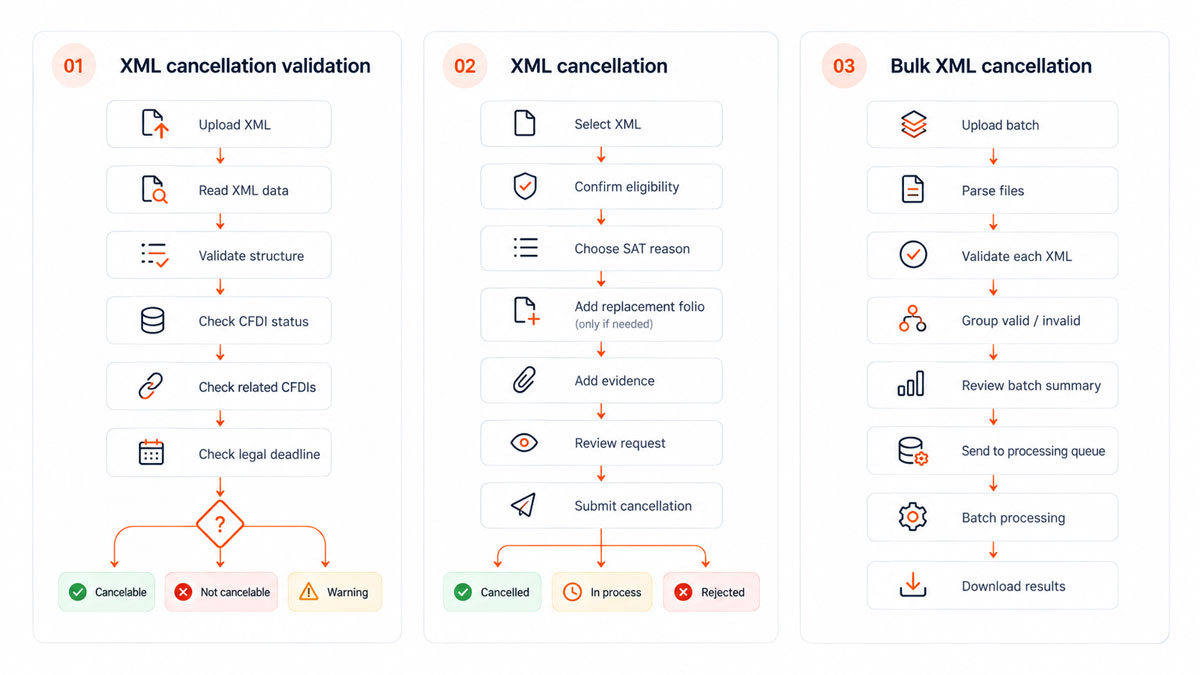
Full flows only on interview
Product decisions
Validate before acting
The system checks CFDI status, related invoices and cancellation eligibility before allowing the user to continue.
Make blockers explicit
Instead of simply disabling the action, the experience explains why a CFDI cannot be cancelled and what needs to be resolved first.
Guide cancellation step by step
The process was divided into clear stages: cancellation reason, supporting evidence, review and confirmation.
Preserve cancellation context
Users can add supporting information and evidence so each cancellation has a documented business reason beyond the SAT code.
Support high-volume operations
Bulk cancellation was designed as a separate workflow, allowing multiple XML files to be validated, grouped and processed without forcing users through the individual flow repeatedly.
Keep sensitive actions traceable
Cancellation activity should preserve user, timestamp, reason, evidence and final status to create a reliable audit trail.
Design
Primary colors
#E66400
#333E48
Action colors
#2F80ED
#EB5757
#27AE60
#F2C94C
Font colors
#000000
#AAAAAA
#FFFFFF
Grey colors
#555555
#717171
#8E8E8E
#AAAAAA
#AAAAAA
#E3E3E3
Typography
Futura Bold
Aa
A B C D E F G H I J K L M N O P Q R S T U V W X Y Z
a b c d e f g h i j k l m n o p q r s t u v w x y z
Futura
Aa
A B C D E F G H I J K L M N O P Q R S T U V W X Y Z
a b c d e f g h i j k l m n o p q r s t u v w x y z
Wireframe & Mockup
Prototype only on interview
Solution
A guided CFDI cancellation experience that combines validation, fiscal rules, supporting evidence, and traceability across individual and bulk cancellation flows.
Cancellation searching list
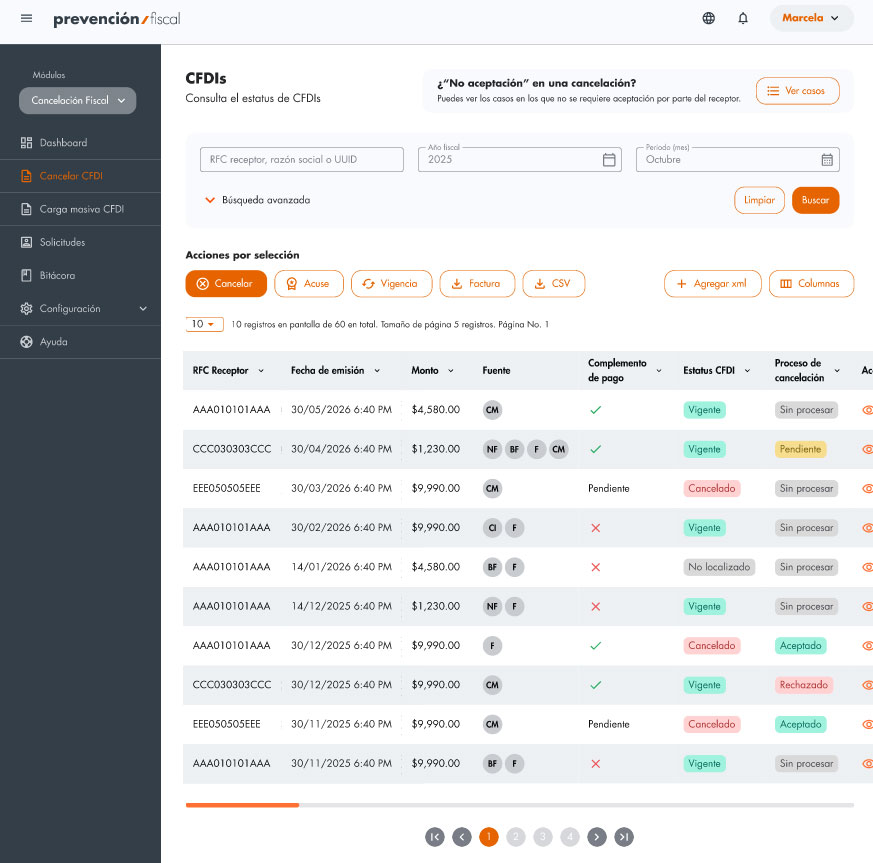
An Add XML action allows users to incorporate a CFDI directly into the workspace without leaving the cancellation flow.
The table can be adapted through column configuration, helping users focus on the information relevant to each cancellation task.
The interface separates CFDI Status from Cancellation Process, making states such as Pending, Accepted, Rejected or No process immediately visible.
Cancellation request
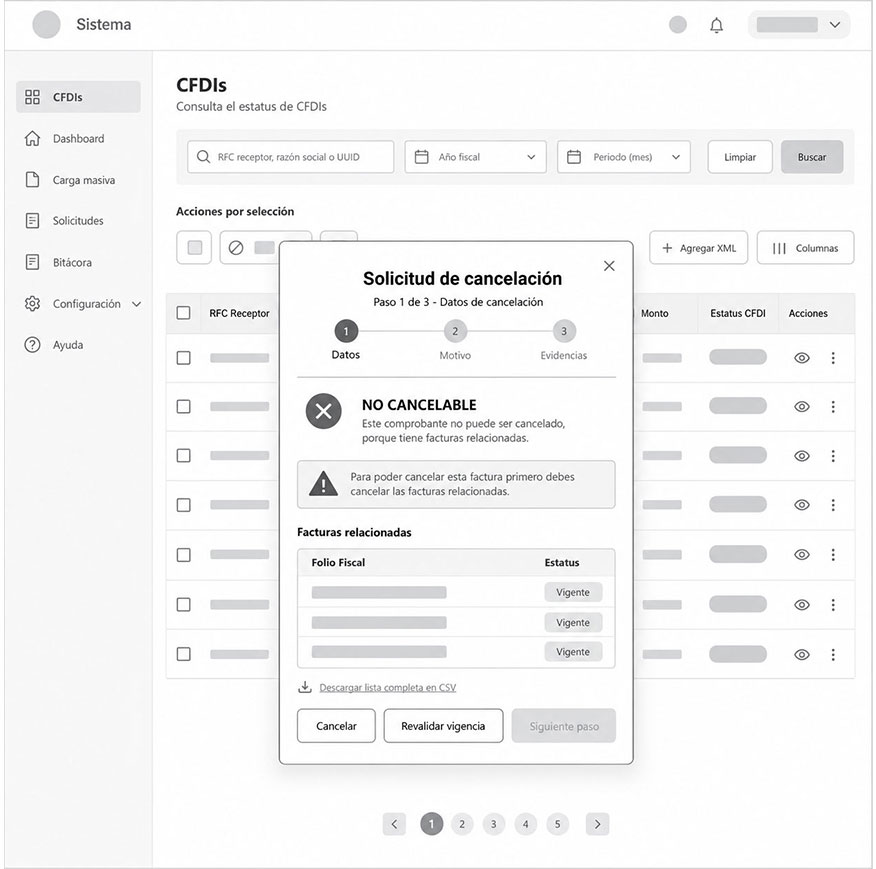
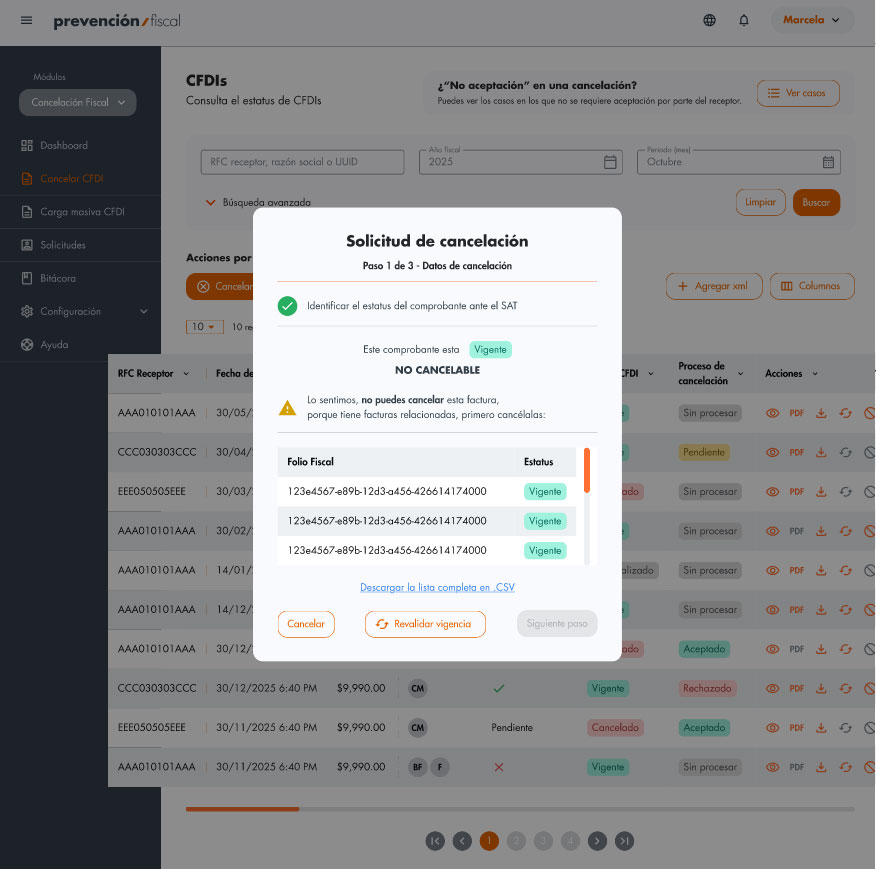
The request is organized into a 3-step guided process, keeping the user focused on the current stage while preserving the context of the selected CFDI.
The system validates the CFDI first and clearly communicates both its fiscal status (Vigente) and its cancellation eligibility (Not cancelable) before enabling the next step.
Related UUIDs are displayed directly in the cancellation request, explaining what is preventing the cancellation and which documents must be resolved first.
Kind of cancellation
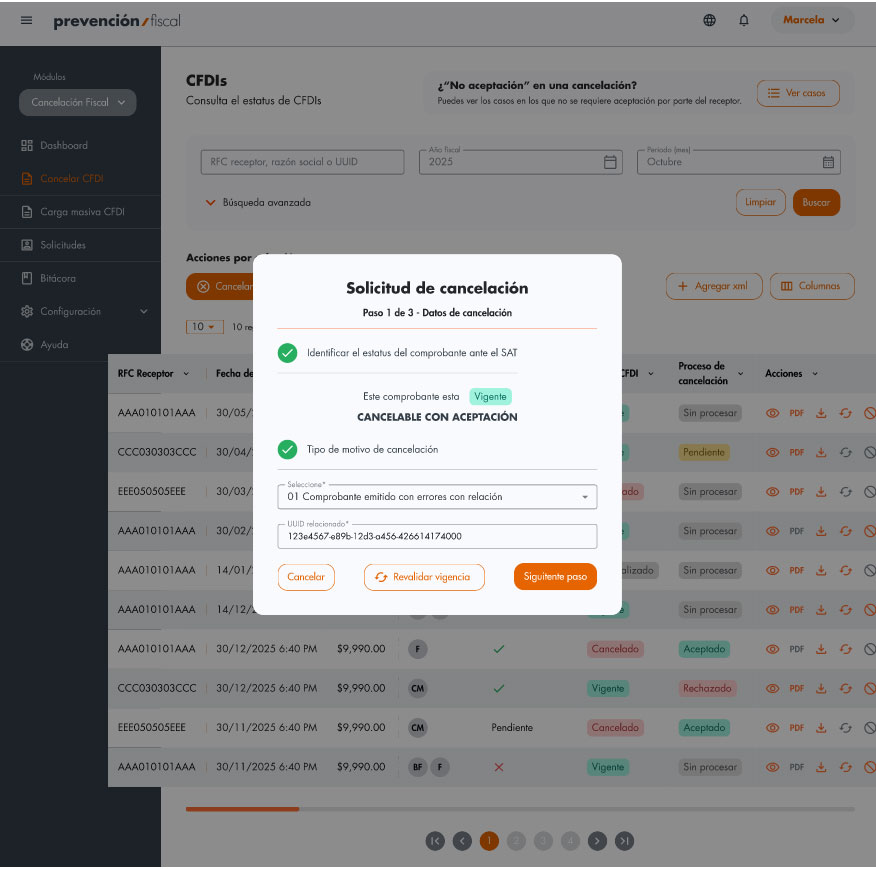
Users select the SAT cancellation reason as part of the guided request, allowing the interface to adapt the next fields and validations to that scenario. Only the information required for the selected cancellation scenario is shown before enabling Next step.
Evidence of cancellation
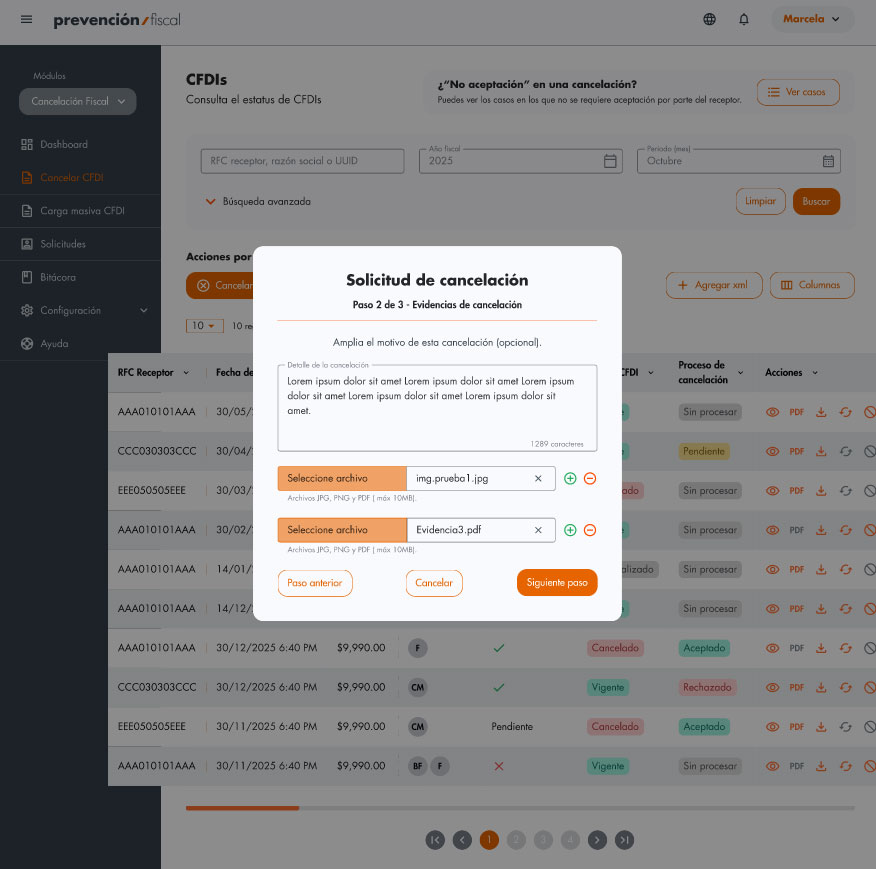
An optional context field allows users to expand the reason for cancellation, adding more clarity before the request is submitted.
Users can attach evidence files directly in the flow, making documentation part of the cancellation request instead of an external step. The interface supports multiple attachments and communicates accepted formats and file-size limits, helping users prepare valid evidence before submission.
Cancellation status
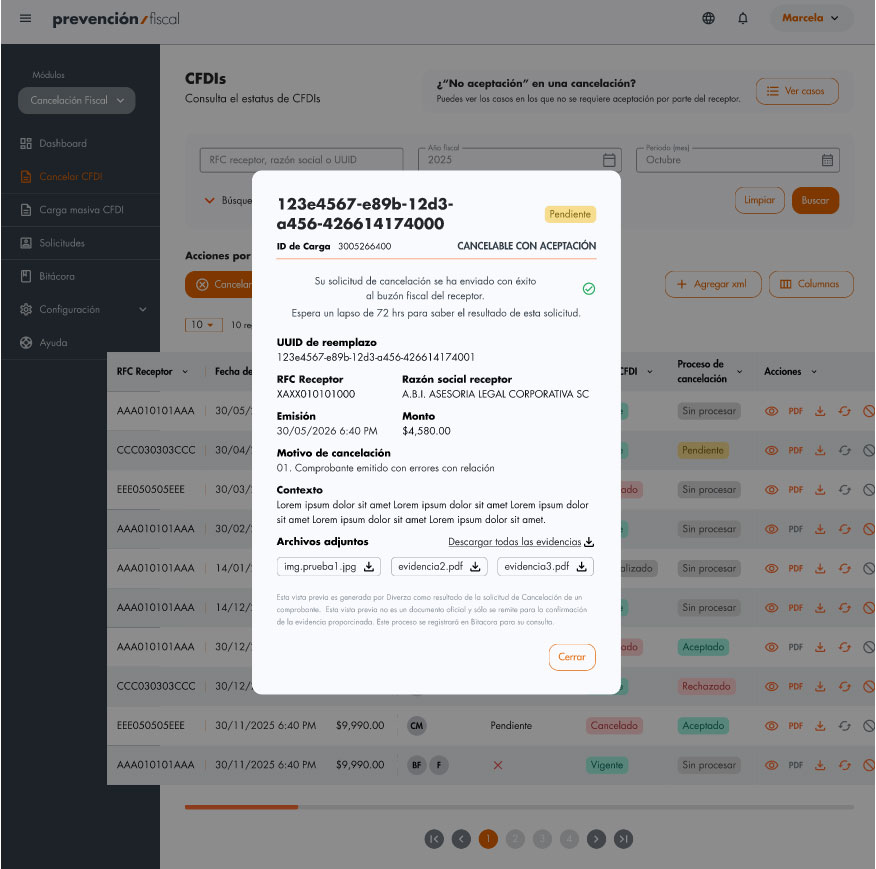
The detail view consolidates the replacement UUID, receiver, issue date, amount, SAT reason and context in one place, creating a clear record of the request.
Bulk upload
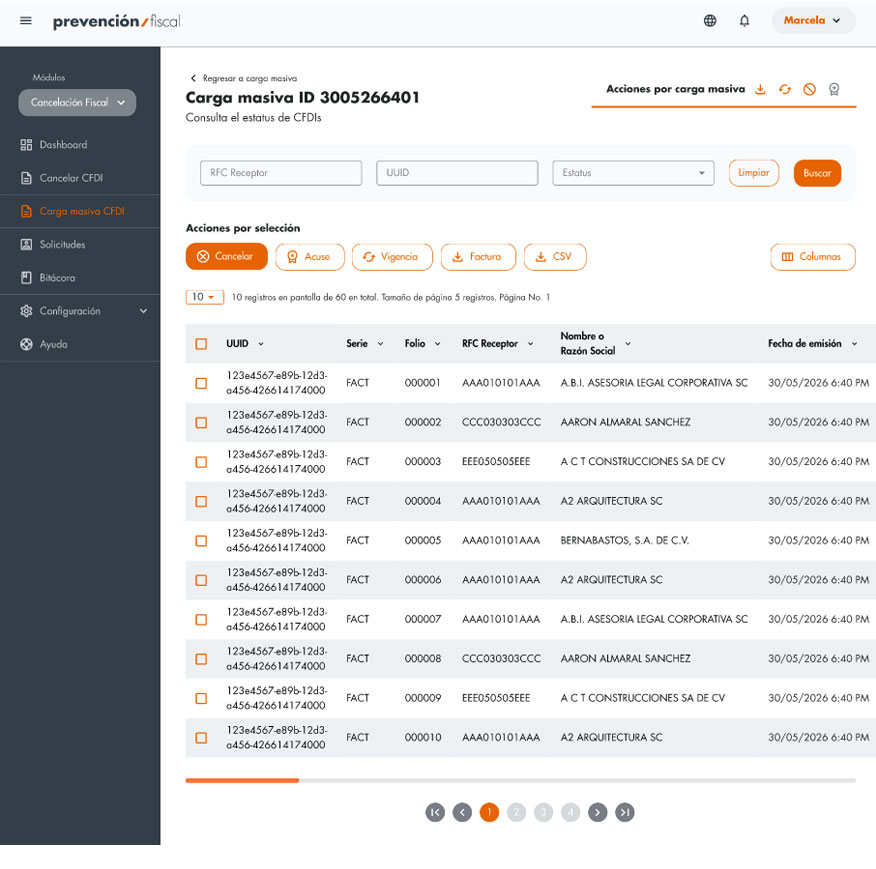
The bulk upload detail centralizes actions for the entire batch, allowing users to perform operations such as cancellation, status checks or document generation from a single workspace.
Each upload is grouped under a Bulk Load ID, keeping the processed CFDIs, filters and actions tied to the same batch context.
Prototype only on interview
Validation
CFDI Status · Cancellation Eligibility · Related CFDIs · SAT Reasons · Receiver Acceptance · Legal Deadline · Supporting Evidence · Audit Trail · Cancellation Request · Bulk Cancellation
Stakeholder review
The proposed flows and requirements were reviewed with Product, Development and Legal stakeholders to verify fiscal logic, dependencies and technical feasibility.
Flow refinement
Cancellation scenarios were iterated to clarify blockers, related CFDIs, evidence requirements, legal warnings and the different SAT outcomes.
Validation scope
The project reached the product definition and interface design stage. Final usability testing and implementation were not completed before my participation ended.
Project learning
Compliance should guide the experience
Fiscal rules work better when they are translated into clear decisions, warnings and next steps instead of remaining hidden in system logic.
Traceability is part of the product
In sensitive operations such as CFDI cancellation, reasons, evidence, timestamps and user actions are as important as completing the transaction itself.
Complexity needs progressive guidance
Separating eligibility checks, cancellation reasons, evidence and confirmation helped turn a rule-heavy process into a more understandable workflow.